Pose transfer works: the woman in the dress follows the briefcase poses
Status: reproduced, N=3 per arm (seeds 42/43/44). Zero stranded GPU locks across every build. Nothing here is a novel result — pose-conditioned video generation is a known technique and the node is someone else's work. What this write-up establishes is narrower and, for us, more useful: it runs on this rig, on one 24 GB card, through our pipeline, and the effect survives replication. Three days from "here's a ControlNet link" to a replicated, published result — 23 days if you count from the first feasibility check that said this rig couldn't do it. 18 minutes of GPU per 12-second clip, 20 of 24 GiB VRAM at peak. The August feasibility check on this exact technique stopped before its first render — "can this rig run it at all," answered no, blocked on a 124 GB checkpoint. That blocker cleared on 2026-09-15 when a loader shipped for Kijai's pruned variant. This is the same experiment, unblocked and carried through.
Abstract
MiniMax-H3 accepts a pose-skeleton control video through a third-party ControlNet node (wyzborrero/ComfyUI-H3-FunControl, published the morning of 2026-09-15) that loads Kijai's curve-form pruned checkpoint instead of Alibaba's full-width release. The question was never whether pose conditioning works in general — it does, and has for a while on other model families. The question was whether it works here: one RTX 3090, this ComfyUI install, our Concourse pipeline, on a subject the control has never seen.
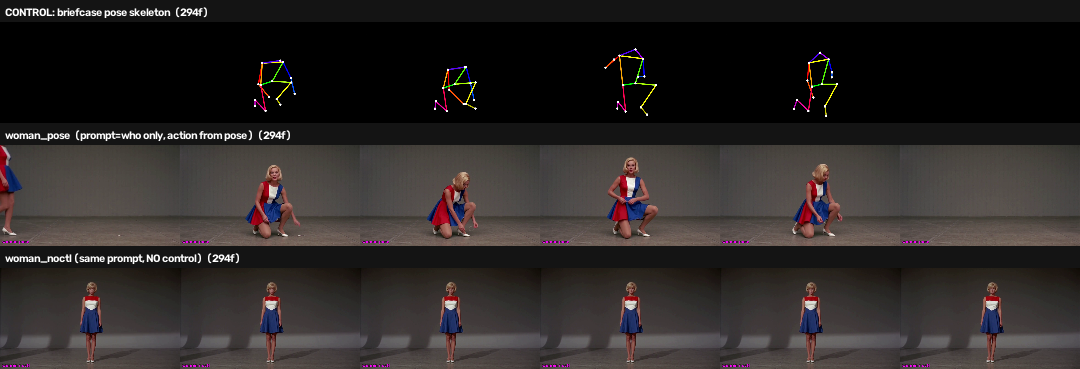
It does. With a prompt describing only who and where, and a control video supplying what happens, H3 rendered a woman in a 1960s mini dress kneeling and reaching toward the floor — an action the prompt never mentions. The matched no-control arm, same prompt and seed, produced a woman standing still. Repeated at three seeds, the split is clean: every pose arm crouches, no control arm does.
Two earlier experimental designs could not have established this, for opposite reasons. The design error is the more transferable part of the write-up, so both are recorded below.
Hypothesis
A pose skeleton extracted from arbitrary footage, fed to H3FunControlApply,
will impose that skeleton's action on a generation whose text prompt does not
describe the action.
Dependent variable: presence and timing of the action beats — kneel, ground manipulation, rise, exit — in the rendered subject, judged against the control skeleton.
Falsifier: the pose arm stands still like the no-control arm, or performs action uncorrelated with the skeleton's timing.
Written before the arms rendered, per the repo's experiment design standard.
Methods
Verifying the checkpoint before trusting the README
The loader accepts only the curve-form variant. Rather than trust the documentation, the safetensors headers were read directly on the box:
| checkpoint | adaln_proj.linear |
metadata | loader |
|---|---|---|---|
..._pruned_bf16 |
[96768, 8] |
adaln_basis |
accepted |
..._union (full width) |
[96768, 2688] |
— | explicitly refused |
Both had been downloaded back in August, so nothing needed fetching. The node
itself is 560 lines with zero third-party imports — only torch and comfy.*,
reusing comfy.ldm.minimax.model.DiTBlock. That is why it is small: with
curve-form weights, a control block simply is Comfy's own DiT block. It was
pinned by commit into comfyui-local with a PINNED_COMMIT file so the
container's state stays auditable.
Building a control video from footage we own
No pose preprocessor is installed in this ComfyUI (only Canny), so the skeleton
is produced offline with MediaPipe PoseLandmarker, drawing an OpenPose-style
coloured skeleton at exactly the generation's dimensions and frame count —
the node hard-fails when control token count diverges from the video segment.
Rather than download a human-activity dataset (Kinetics, AVA, NTU RGB+D were all considered), the source clip was rendered by H3 itself: a man in a late-1960s suit walking in with a briefcase, kneeling, assembling a tripod, and leaving. Perfect provenance, exact scale control, no licensing question, and it sidesteps the defect that killed an earlier experiment in this line — reference artifacts whose source material was unknowable.
The measurement that redirected the whole experiment
Two properties of the control signal turned out to matter more than any node parameter: how often the detector finds the figure, and how much of the frame that figure occupies. The node's README names subject size — not strength — as the binding constraint on control authority.
| control video | skeleton bbox | lit px | detection |
|---|---|---|---|
| 0.40 MP, uncropped | 7.2 % | 6,050 | 100 % |
| 0.98 MP, uncropped | 7.1 % | 12,360 | 100 % |
| 0.98 MP, autocropped | 10.6 % | 18,833 | 100 % |
Raising resolution alone does nothing for subject size. Doubling the pixel budget left the bounding box unchanged at ~7 %. That is the finding that matters operationally: "render at a higher resolution" is not a fix for a weak control, because the figure scales with the frame.
Cropping the source to the figure before extraction is the fix. The first implementation stretched a tall crop into 16:9 and detection collapsed to 52 % — distorted limb proportions defeat the detector. Letterboxing restored 100 %. Aspect fidelity beats filling the frame.
Three designs, only one of which can answer the question
| design | prompt | control | can it answer the hypothesis? |
|---|---|---|---|
| agreement | briefcase action | skeleton of H3's own render of that prompt | No — confounded |
| contradiction | briefcase action | turn-in-place skeleton | No — measures dominance |
| decomposed | who and where only | briefcase skeleton | Yes |
Why agreement fails. The skeleton came from H3's own render of the same prompt and seed, so agreement between output and control was guaranteed whether or not the ControlNet contributed anything. That build looked like a success and proved nothing.
Why contradiction fails. Two mutually exclusive instructions admit no coherent video. The design answers "which signal dominates?" — genuinely useful, and the answer was the prompt wins — but the footage is uninterpretable as a quality result, and ranking tools against each other on it is a category error.
Why decomposed works. The prompt was audited to contain no action or prop vocabulary — including removing "locked off on a tripod" from the camera boilerplate, since tripod is precisely the prop the pose introduces. Any action in the output is therefore attributable to the control.
Results
Both arms: 1312×736 (0.966 MP), 294 frames (12.25 s at 24 fps), same seed, strength 0.8, control window 0.0–0.6. Prompt in both: a young woman with a blonde bob in a red/white/blue colour-blocked A-line mini dress, studio, locked-off camera. No action described.
| arm | control | outcome |
|---|---|---|
woman_pose |
briefcase skeleton | kneels, crouches, shifts weight, rises, exits — tracking the skeleton timepoint by timepoint |
woman_noctl |
none | stands, essentially one pose across all six sampled timepoints |
Identity and wardrobe held in both arms, so the pose drove the body without disturbing appearance.
Replication at seeds 43 and 44
One render proves nothing here. Single-render results in this experiment line
have a poor track record against replication — reference arms that turn out to
sit inside seed noise, a retention dial that measures something other than what
it appears to. So the arms are re-run at two more seeds, changing nothing but
RandomNoise.noise_seed.
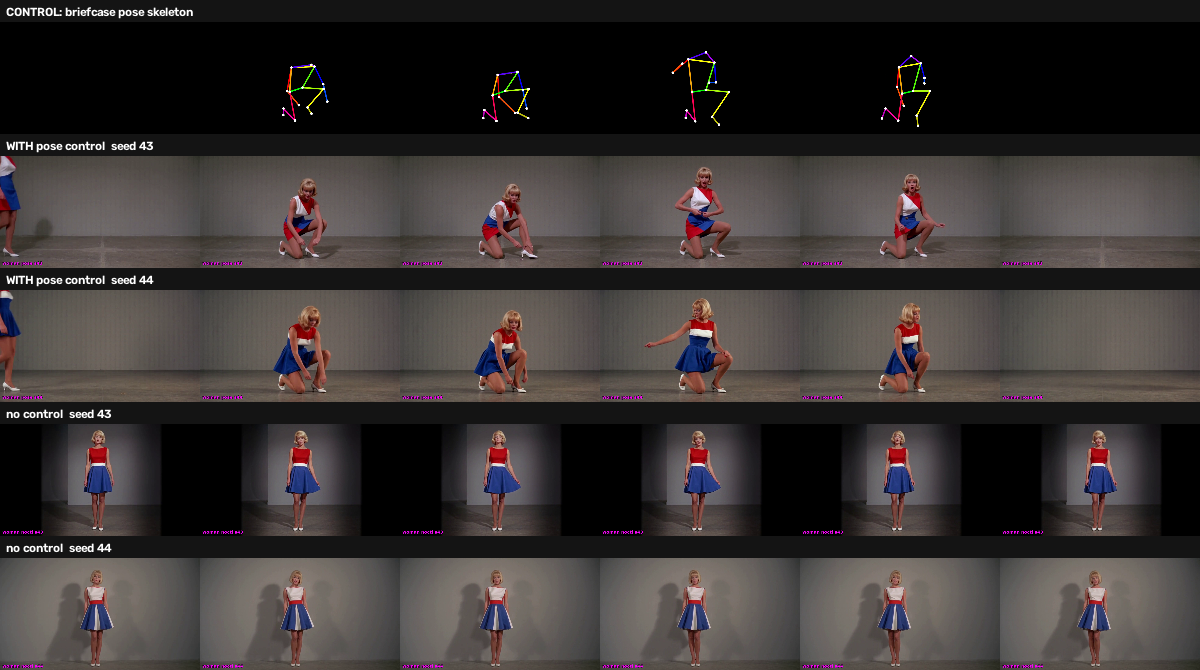
| seed | with pose control | no control |
|---|---|---|
| 42 | crouches, rises, exits | stands |
| 43 | crouches, rises | stands |
| 44 | crouches, rises | stands |
Three for three, with no exceptions in either direction. The crouch lands in the middle timepoints in both pose arms, matching where the skeleton kneels.
The render times corroborate it independently: pose arms took 1081 s and 1079 s against 865 s and 867 s for the no-control arms — roughly 215 s of extra work per arm, at both new seeds. The ControlNet is not quietly no-op'ing.
What pose control does not do
No briefcase and no tripod appear in any pose arm. The control carries body position only — it has no channel for objects, so the woman performs the kneeling-and-reaching motion of handling something with nothing there. For production use that is the practical boundary: pose supplies the action, the prompt still has to supply the props.
The failure mode worth knowing about
In the contradiction design at 0.98 MP, something stranger than "control ignored" happened: the prompt still governed the human, but the skeleton rendered as a physical armature standing in the frame — a dark angular structure with the skeleton's proportions, present from the first frame. The conditioning had gained enough authority to enter the image without gaining enough to steer the subject, so it was absorbed as a foreign object. That is the signature of an under-weighted control, distinct from one doing nothing.
What it actually cost
The thing I always want to know when someone reports a result, and rarely find: how long did this take in real hours, on real hardware?
Render time, measured from ComfyUI's own execution timestamps rather than wall-clock guesses, at 1312×736 × 294 frames (12.25 s of video at 24 fps):
| arm | renders | each | per second of output |
|---|---|---|---|
| no control | 5 | 855–874 s (~14.4 min) | ~70 s |
| with pose control | 3 | 1077–1101 s (~18.1 min) | ~88 s |
So roughly 70× real-time without the control, 88× with it — about 26 % slower, or 222 s of extra compute per clip, consistent across every seed. Put plainly: a twelve-second shot is a fifteen-to-eighteen-minute wait, and a four-arm comparison ties up the card for an hour.
Memory. The generation itself is 943 tokens per latent frame, 74 latent
frames, 69,782 sequence tokens. The ControlNet materialises a control
tensor the size of the video sequence alongside the image tensor — the OOM
traceback named them explicitly, control (83190, 5376) and img (83190, 5376), about 0.83 GiB each in bf16.
| configuration | peak VRAM | of 24 GiB |
|---|---|---|
| no control | ~16.2 GiB | 68 % |
| pose control | ~20.0 GiB | 83 % |
native ref_videos v2v |
~20.9 GiB | 87 % |
It fits on a 3090 with roughly 3.6 GiB spare — but only on a clean card.
Running a second arm in the same process without freeing VRAM first put the
ControlNet arm at Free (according to CUDA): 155.69 MiB and killed it
mid-sampler. On 24 GiB this is a real constraint, not a footnote.
Development time. This is the number I set out to publish and then got wrong on the first pass, so here it is at three honest scales.
| span | elapsed |
|---|---|
| Active build: first commit → working result | ~4 hours |
| Asked → published, replicated result | ~3 days |
| First feasibility check → published result | 23 days |
The four-hour figure is real but measures the wrong thing: it is time on task for one branch on one afternoon. Quoting it alone implies you could sit down after lunch and be done, and that is not what happened.
The three days is the number that matters. A ControlNet link arrived on 2026-09-12; the result published on 2026-09-16. In between: a second link with a working node, a day of building, an overnight driver upgrade that took the GPU out, a Concourse database that turned out to have no persistent volume, a stale job timeout that killed the replication run, and roughly five hours of infrastructure repair that produced no renders at all. None of that is interesting as technique and all of it was required to get a result out.
The 23 days is the full story. The August feasibility check looked at this exact technique on 2026-08-24 and concluded blocked, N=0 — the checkpoint wanted ~124 GB. Nothing changed on this end. Someone else shipped a loader for a pruned variant, and that is what moved it. Most of the elapsed time was waiting for the ecosystem, not working.
Within the active four hours, the split was: verify the checkpoint variant, build a pose extractor because none was installed, discover that resolution alone does not fix subject size, and discard two experimental designs that could not answer the question. Wiring the node in — the part a tutorial would cover — was maybe twenty minutes.
Your mileage will differ wildly, because everyone's rig differs. But if you are weighing whether to try this on a single consumer card: the model work is an afternoon, and the calendar is a week. The gap between those two numbers is the part nobody publishes, and it is almost entirely harness — drivers, schedulers, storage, and discovering which of your measurements were measuring nothing.
Files
h3-pose-control.api.json— the pose-conditioned graphh3-no-control.api.json— identical minus the ControlNet, the baseline armmake_pose_control.py— builds a skeleton control video from ordinary footage, no preprocessor node required- README — what you have to change before these will run on your machine
Two caveats up front, because "workflow included" usually implies more than it delivers. These are API-format graphs — what our pipeline submits, so exactly what produced the clips above, but ComfyUI's drag-and-drop expects the UI format. And they name our checkpoints, several of them quantized builds rather than stock releases, so you will be swapping filenames. The ControlNet is the one that is not interchangeable: the loader takes only the curve-form pruned variant.
Conclusion
Pose transfer works on this stack. The node loads, applies, costs real compute, and imposes a specific unprompted action on a novel subject while preserving prompt-specified identity — reproducibly, across three seeds.
None of that is a discovery. It is a reproduction: someone else's node, a known technique, a checkpoint someone else pruned. The value is knowing it runs here, what it costs on a 24 GB card, where its authority runs out, and that the August "this rig cannot do it" verdict is now retired.
The operative division of labour: the prompt says who and where; the pose says what happens. Fighting them is a diagnostic, not a workflow — a lesson that cost four builds to learn properly.
This also makes ControlNet and H3's native ref_videos complementary rather
than competing. ref_videos transfers appearance and idiom; pose control
transfers motion, and neither carries props. They answer different questions,
and the mid-session claim that one is "clearly better" does not survive the
decomposed design.
Limitations
- The source is H3's own output. This shows H3 reproducing motion it can already generate. Driving from genuinely external footage is the harder test, and is not done.
- One prompt, one skeleton. Three seeds establish the effect is not noise; they say nothing about how it generalises across subjects or actions.
- No quantitative pose-adherence metric. The verdict is visual. Two pixel metrics were attempted and both failed — one used each clip's own opening frames as a baseline (so a structure present from frame zero registered as no change), the other used a brightness threshold defeated by a darker render. Consistent with earlier findings in this line that pixel distance measures magnitude, not kind.
Next
- Pose extracted from genuinely external footage — the real generalisation test.
- A control-window sweep at fixed resolution.
- Pose control combined with a worn-cohort reference artifact — motion and wardrobe arriving through independent channels.
Artifacts
Eleven render-and-review builds. Every render held the cross-pipeline GPU
lock and egressed through a pipeline put: — zero stranded locks, on
infrastructure that was stranding them seven times in fourteen hours two days
earlier. Two builds failed without producing a result: one to an
out-of-memory when a second arm started on a card the first had already
filled, one to a stale 45-minute job timeout that predated the move to the
0.98 MP preset. Neither cost a conclusion.
Seven Immich albums, from the source clip through to the seed replicates.
Machine-readable design and provenance live alongside the fixtures in
EXPERIMENT.yml
on feature/h3-funcontrol-pose-20260915.